
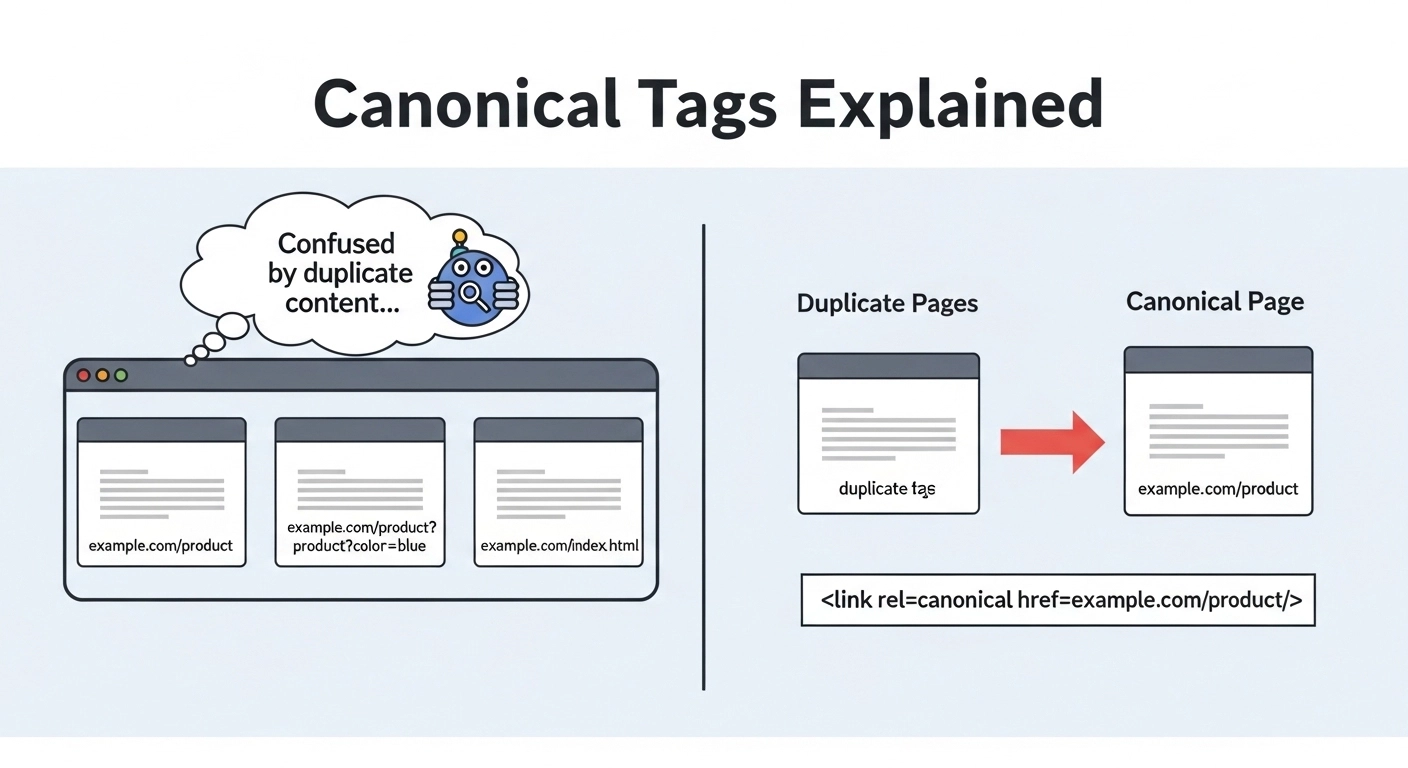
Canonical Tags Explained: A Simple Guide to Avoid Duplicate Content Issues
If you’ve ever worked on a website or even just started learning SEO, you’ve probably heard the term canonical tags. At first, it sounds technical and confusing—but it’s actually one of the simplest and most powerful SEO tools you can use to keep your site clean and search-engine friendly.
In this guide, we’ll break down canonical tags explained in plain English, show real examples, and help you understand exactly when and how to use them.
What Is a Canonical Tag?
A canonical tag is a small piece of HTML code that tells search engines which version of a page is the “main” or “preferred” version.
In simple terms:
It helps Google understand which URL should be treated as the original when similar or duplicate pages exist.
The canonical tag looks like this:
<link rel="canonical" href="https://example.com/page-url/" />
This tells search engines:
👉 “Hey, this is the main version of this page. Please rank this one.”
Why Canonical Tags Matter for SEO
Search engines don’t like duplicate content. If multiple pages have the same or very similar content, Google may get confused about:
- Which page to rank
- Which page to index
- How to distribute ranking signals
This can lead to lower rankings or even indexing issues.
Canonical tags solve this problem by consolidating SEO value into one preferred URL.
Example of the problem
Imagine you have these URLs:
- example.com/shoes
- example.com/shoes?color=black
- example.com/shoes?ref=facebook
All three show the same product page.
Without a canonical tag, Google might treat them as separate pages.
With a canonical tag, you tell Google:
👉 “All of these point to example.com/shoes as the main page.”
When Should You Use Canonical Tags?
Canonical tags are not needed for every page—but they are essential in specific situations.
1. Duplicate or Similar Content
If multiple pages have identical or nearly identical content, use a canonical tag.
Common in:
- E-commerce product filters
- Blog categories
- Pagination pages
2. URL Variations
Sometimes the same page can be accessed through different URLs:
- With tracking parameters
- With session IDs
- With HTTP vs HTTPS
- With www vs non-www
Canonical tags help unify them.
3. Syndicated Content
If your content is published on another site, the canonical tag ensures your original page gets credit.
Example:
- Your blog is republished on Medium
- You set your original blog as canonical
4. Printer-Friendly Pages
If your site creates printable versions of pages, those should point back to the main page.
How Canonical Tags Work (Behind the Scenes)
When Google crawls your site, it checks the canonical tag and:
- Identifies duplicate or similar pages
- Chooses the canonical (preferred) URL
- Consolidates ranking signals (backlinks, authority, etc.)
- Indexes only the main version
This helps prevent SEO dilution across multiple URLs.
Best Practices for Canonical Tags
To use canonical tags correctly, follow these simple rules:
1. Always use absolute URLs
✔ Correct:
<link rel="canonical" href="https://example.com/page/" />
❌ Incorrect:
<link rel="canonical" href="/page/" />
2. Use self-referencing canonicals
Even if a page has no duplicates, it’s good practice to point it to itself.
3. Avoid multiple canonical tags
Only one canonical tag per page. Multiple tags confuse search engines.
4. Don’t canonicalize unrelated pages
Each canonical must point to a very similar or identical page.
5. Combine with proper internal linking
Canonical tags work best when your site structure is clean and consistent.
Common Mistakes to Avoid
Many beginners misuse canonical tags. Here are the biggest mistakes:
❌ Pointing all pages to the homepage
This can remove important pages from search results.
❌ Using canonical instead of redirects
If a page is permanently moved, use a 301 redirect instead.
❌ Ignoring parameter-based URLs
These are often the biggest source of duplicate content.
❌ Canonicalizing paginated content incorrectly
Pages like page 2, page 3 should not all point to page 1 unless carefully planned.
Canonical Tags vs Noindex: What’s the Difference?
People often confuse canonical tags with “noindex.”
Here’s the difference:
- Canonical tag: Tells Google which version to rank
- Noindex: Tells Google not to index the page at all
Use canonical when you want to consolidate pages.
Use noindex when you want to remove a page from search results completely.
Simple FAQ: Canonical Tags Explained
What is a canonical tag in SEO?
A canonical tag tells search engines the preferred version of a webpage when duplicate or similar pages exist.
Do canonical tags affect rankings?
Yes. They help consolidate ranking signals like backlinks and prevent SEO dilution across duplicate pages.
Are canonical tags a ranking factor?
Not directly, but they improve how Google understands and indexes your site, which indirectly affects rankings.
Can I use multiple canonical tags on one page?
No. Each page should have only one canonical tag.
What happens if I don’t use canonical tags?
Search engines may index duplicate pages, split ranking signals, and reduce your overall SEO performance.
Conclusion
Canonical tags might seem like a small technical detail, but they play a big role in keeping your website SEO clean and organized. By clearly telling search engines which page is the main version, you avoid duplicate content issues and help your most important pages rank better.
If your site has multiple URLs for the same content—or you’re managing an e-commerce store or blog—canonical tags are not optional. They are essential.
